What Changes When a Website Displays Local Currency but Processes Payments in Another Country
A website can show a price in the shopper’s local currency without processing the transaction locally. The currency displayed at checkout, the currency charged to the card, the location of the merchant’s acquiring bank, and the currency ultimately paid to the merchant are separate parts of the payment flow.
This distinction matters because a shopper may see a familiar currency and still be making a cross-border purchase. The issuing bank may apply a foreign transaction or currency-conversion fee according to its own card terms. The merchant may also pay cross-border acquiring charges or incur conversion costs when the payment currency differs from its settlement currency.
None of these charges is automatic in every transaction. The outcome depends on the merchant’s payment setup, card network rules, acquiring arrangement, settlement account, and the shopper’s issuing bank.
What Actually Changes When Displaying One Currency and Processing Payments Elsewhere?
When a website displays one currency but uses an acquirer in another country, the payment should not be described as domestic simply because the checkout amount looks local. Cross-border classification: Card networks generally assess the parties and countries involved in the transaction, not only the currency printed on the checkout page. Visa’s rules contain regional and country-specific requirements for issuers, acquirers, and merchants, while processor pricing may apply additional charges when a card is issued outside the merchant’s processing market.
Possible cardholder fees: A bank may charge a foreign transaction or currency-conversion fee even when the transaction appears in the cardholder’s billing currency. Mastercard advises cardholders who see such a fee on a local-currency purchase to contact their issuing institution because the issuer determines the applicable charge. The original claim that every shopper will pay a 1.5% to 3.5% fee is inaccurate. Some cards charge no foreign transaction fee, while others calculate the fee according to the transaction’s foreign merchant location, currency conversion, or both.
Merchants should therefore avoid promising that the amount displayed at checkout will always be the final amount appearing on the customer’s statement. A clearer notice is that the shopper’s bank may apply separate international transaction charges. Unexpected statement charges can lead to complaints or disputes, but there is no reliable basis for describing them as a leading cause of cart abandonment without transaction-specific data. Merchants should monitor their own checkout exits, support contacts, refund requests, and dispute reason codes instead of relying on unsupported industry percentages.
Distinguishing Between MCP and DCC: Which One Can Cost the Consumer More?
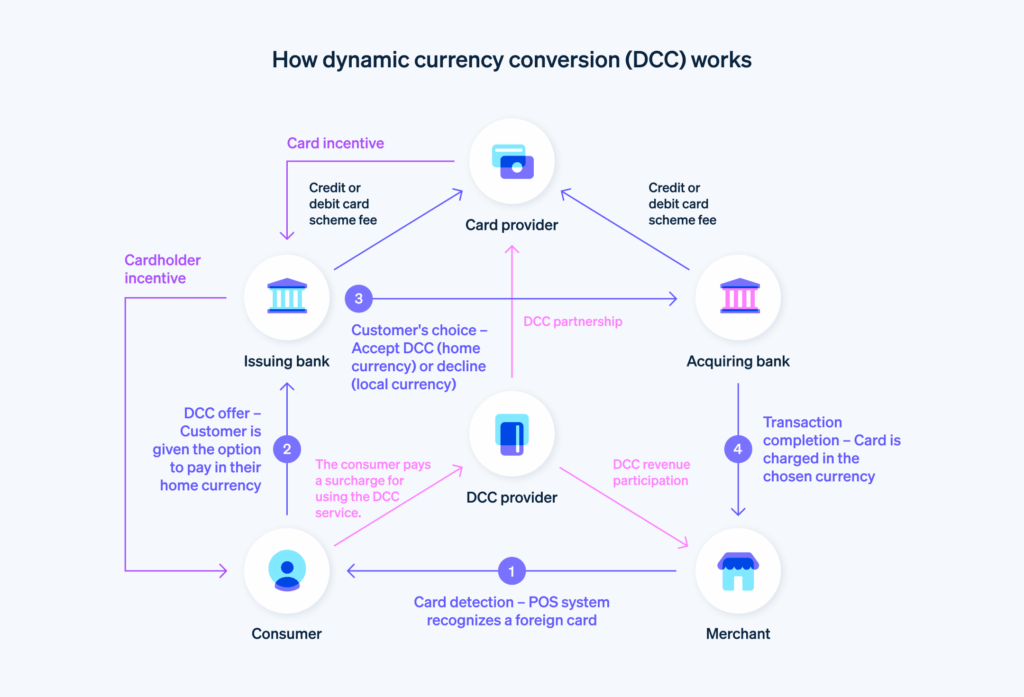
Multi-Currency Pricing and Dynamic Currency Conversion both involve currency choice, but they occur at different points and give control to different parties.
| Criteria | Multi-Currency Pricing (MCP) | Dynamic Currency Conversion (DCC) |
|---|---|---|
| Core Nature | The merchant lists and charges products in more than one supported currency. | A conversion option is offered during payment so the cardholder can choose the merchant currency or the cardholder’s home currency. |
| Rate Control | The merchant or payment provider sets the product price and conversion policy before the transaction is completed. | The DCC provider supplies the exchange rate and markup offered at the time of payment. |
| Possible Costs for Users | The card issuer may still charge a foreign transaction fee if the merchant or acquirer is located abroad. | The quoted home-currency amount includes the DCC exchange rate and any disclosed markup. The issuer’s own terms may also matter. |
| User Experience | The shopper normally sees a fixed checkout amount in the selected currency. | The shopper must be shown a currency choice and enough information to compare the conversion. |
MCP does not guarantee local processing. A merchant may accept payment in Korean won, for example, while acquiring the transaction outside South Korea and settling the proceeds in another currency. In that case, the merchant may incur conversion costs, and a Korean card issuer may still treat the purchase as international.
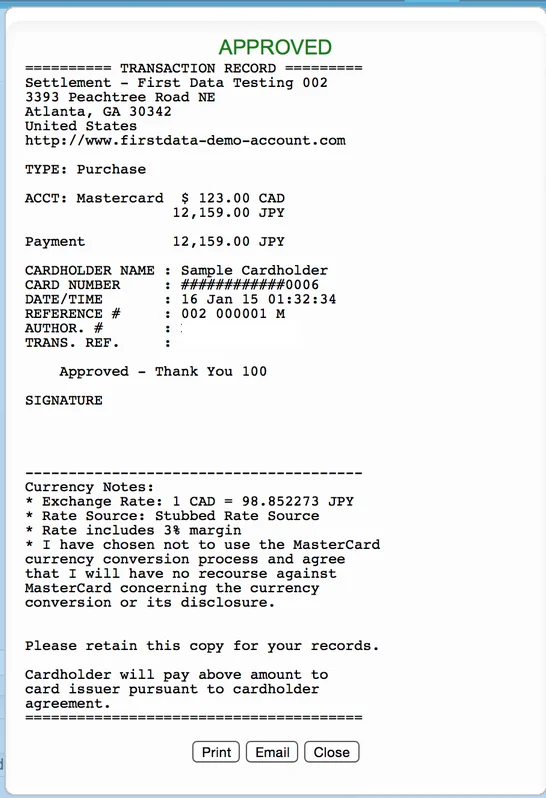
DCC is not automatically fraudulent or hidden. Visa explains that DCC allows a customer to pay in the cardholder’s home currency and that the presented amount includes an exchange rate and additional fees. Payment providers are also required to disclose the rate and markup and allow the shopper to decline DCC. The practical consumer rule is to compare the DCC rate with the rate and foreign transaction fee offered by the card issuer. Paying in the merchant’s original currency is often worth considering, but it is not universally cheaper because card products have different fee structures.
The Truth About Online Consumers: Trust Depends on Currency Consistency
The original percentages claiming that 76% of shoppers demand local-currency processing, more than 60% abandon checkout after a currency change, and repeat purchases fall by over 40% could not be verified from the cited organizations. They should not be published as facts. Currency consistency still matters, but it should be discussed without invented figures. The product page, cart, payment page, order confirmation, receipt, and refund policy should clearly identify the currency being charged.
A shopper who sees ₩120,000 throughout the website should not discover only after entering card details that the transaction will be submitted in US dollars. If the displayed currency is only an estimate, the site should state that the final amount will be converted at checkout. Merchants should also separate their own charges from possible bank charges. The checkout can confirm the amount submitted by the merchant, but it cannot guarantee that the issuing bank will not add a foreign transaction fee.
The best evidence comes from the merchant’s own data. Businesses should compare checkout completion, payment authorization, customer-service contacts, refunds, and disputes by country, currency, payment method, issuer region, and acquiring route.
Cash Flow Management and Settlement Timing
The original article attributed a universal T+2 or T+3 cross-border settlement rule to J.P. Morgan, but no supporting source established that all offshore acquiring transactions follow that timeline. Settlement schedules vary by payment provider, merchant country, payment method, risk category, banking day, reserve arrangement, and account history. Local acquiring may simplify fund flows, but it does not guarantee same-day or next-day access to money.
Merchants should obtain written answers to four separate questions:
- Authorization timing: When does the issuer approve or decline the customer’s payment?
- Capture timing: When does the merchant finalize the charge?
- Settlement timing: When does the payment provider add the net amount to the merchant balance?
- Payout timing: When does the provider transfer that balance to the merchant’s bank account?
These events are often confused. A payment can be approved immediately while the merchant payout arrives days later. Local payout rails can be faster and may avoid SWIFT-related charges. Adyen, for example, distinguishes between local payouts through domestic rails and cross-border payouts sent through SWIFT, noting that cross-border transfers can take longer and may attract incoming bank fees. This is a provider-specific arrangement, not a universal settlement rule.
Behind-the-Scenes Operational Risks: FX Volatility and Profit Margin Erosion
A merchant creates FX exposure when it charges the customer in one currency but receives settlement in another. The financial effect depends on when the rate is fixed, which party performs the conversion, the provider’s markup, and the time between pricing and settlement. The claim that a 48-hour delay routinely removes 2% to 5% of profit is unsupported. Currency movements can be small or large, and the effect on margin depends on the currencies involved and the merchant’s existing margin.
Refunds create a second issue. A provider may convert the refund using a new exchange rate, creating a difference between the merchant’s original settlement amount and the amount needed to return the customer’s original payment currency. Adyen documents this type of remainder when converted refunds use prevailing exchange rates. Processing fees also vary by contract. Stripe states that its original processing fees are not returned when a payment is refunded, although the exact refund-fee policy can differ by pricing arrangement and payment method. Merchants should calculate margin using the actual exchange rate, provider markup, card fees, refund policy, dispute costs, and payout charges rather than assuming a fixed percentage.
The Power of Alternative Payment Methods Tied to Local Currencies
Local payment methods can give shoppers a familiar way to pay and reduce dependence on international card transactions. They do not all work in the same way. Pix allows Brazilian customers to pay through their banking applications using a QR code or Pix payment string. iDEAL, now transitioning under the Wero name, allows customers in the Netherlands to authenticate payments through their banks.
KakaoPay and Naver Pay are digital wallets used in South Korea. Depending on the integration, a wallet may be linked to a card or another funding source, so using a local wallet does not necessarily mean the international card network is bypassed. The original claims that cross-border cards are approved only 60% to 70% of the time and that local methods routinely exceed 95% are not reliable universal benchmarks. Authorization performance varies by merchant, country, issuer, fraud controls, authentication flow, customer type, and transaction value.
Local methods also do not promise zero FX costs. A method may require a particular presentment currency, while the merchant may still convert its proceeds or receive a cross-border payout. iDEAL transactions, for example, are presented in euros, while the availability and payout setup depend on the payment provider and merchant account.
Displaying a local currency does not reveal where a transaction is acquired, how the card issuer will classify it, or which currency the merchant ultimately receives. Consumers should confirm the currency charged by the merchant, decline or accept DCC only after reading the rate and markup, and review their card’s foreign transaction terms. Merchants should separate presentment currency, processing location, settlement currency, and payout route in their payment analysis. Local acquiring and local payment methods can improve a cross-border checkout, but they do not automatically eliminate FX costs, cardholder fees, settlement delays, or failed payments. A trustworthy checkout states what the merchant will charge, identifies when conversion occurs, discloses available currency choices, and warns that the customer’s bank may impose separate fees.